Goal setting

How do you set your goals? We all want to achieve. We all want to get better at things. We all want to move ourselves towards goals. But maybe the way we set ourselves targets just isn’t helpful. There is a tendency to want to put figures on things because we all know how figures work. “I want to lose 10 kilos”, “I want to run 5k in 25 minutes”, “I want to run a marathon”. These are all fitness goals but there will be others. Maybe, “I want to save £1000 by the end of year”.

These statements are problematic though because one of the things we are good at as people is not hitting the target. Think back to all of those new years resolutions that go unmet. Think of all of those weight loss strategies that didn’t get you to your ‘goal weight’. Think of all those fitness regimes that didn’t get you ripped and slim.

As soon as you set yourself a fixed goal then you run the risk of missing it. But even if you hit it you’ve still got a problem! Once you’ve hit your goal weight what do you do? Go back to eating like you did? What do you do when you hit that 25 minute 5k? Do you stop running? Well, sometimes we do! Sometimes it’s like ‘right that’s it – I’ve done it so I don’t have to worry about it anymore!’ And the weight goes back on or the fitness slides and you have to start again with another goal.

How about simply framing what you want to do differently? I want to get better at being a healthier eater? I want to get better at being a runner? I want get better at being a saver? These things have no end point. They have nothing to ‘fall off’ or ‘fail at’. You want to become a healthier eater so you start nailing the salads and the baked potatoes and then you have a take away. Well, what you are trying to achieve is still there. You’ve not done anything wrong because just because you had a take away doesn’t mean you can’t continue to try to be a healthier eater. When you choose a measurable goal like weight loss and you don’t lose any weight because of that take away the scales shout at you, make you feel bad, and make you think ‘well hey – I’m never going to hit my target weight – so why bother!’ But you can still follow your dream of being a healthier eater because that’s still an on going proposition – it never ends so it’s always available to you to help you frame what your doing. ‘Hey, I had a pizza, but I’m still trying to be a healthier eater’

The difference is maybe a subtle one but the psychology of it apparently really works. It’s like when you have a big task to achieve like, say, write a 3,000 word report. If your goal is to write the report then every time you sit down to do it and you don’t complete it your mind sees that as a failure – ‘I didn’t finish the report’. But if you break it down to manageable chunks. ‘I need to read this article’, ‘I need to think about the structure of the report’, ‘I need to map out what I want to write’ etc etc then you achieve a result whenever you do these individual things giving you a psychological boost. This is called ‘The Power of Small Wins”. This is the ‘how do you eat an elephant – one bite at a time’ strategy!

There’s a similar thing at play with the psychology of setting goals. If your goal is to run a marathon then every time you don’t run a marathon you haven’t achieved it. If your goal is to work on being a better runner then every time you run you are working on that. If your goal is to be a healthier eater then every time you eat you are working on that. Personally, I find that taking this approach helps me make better choices. What I eat isn’t governed by the scales or a target weight but by simply wanting to try and achieve ‘eating healthier’. Yes, I do hope that what that means is weight loss but if it doesn’t it doesn’t and I will continue to try and eat healthier because the positive impact on my life is broader than what the scales say.

Let’s do it!

Emails… the modern tool or the modern scourge?

Emails are great…. and they are not great! Emails allow you to ask the same thing to a number of people at the same time and get answers back quickly – that’s great! …and it can be a nightmare! How many of you get cc’d into things and wonder… “why has someone included me in this!?” For such emails there is the ‘delete’ button! Emails let you send things to people wherever you are and whatever time it is! That’s great…. and that’s not great!

Like them or loathe them they are here to stay I’d imagine though. They appear to have caught on! There are various estimates but it appears the average person at work sends and receives about 130 emails per day. In ‘Organised Mind’ Daniel Levitin tells us that even outside of work we process around 100,000 words every day! That’s remarkable. How do we manage this information overload.

Well, as David Allen, author of ‘Getting Things Done’ says…. if you don’t control it, it will control you. And, as a manager I had was fond of saying, ‘you need to get ahead of it’. Steer it from the front rather than chase it.

How many are in there!?

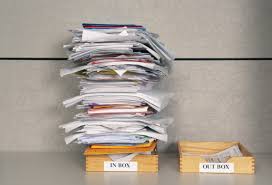
So, how do we manage this onslaught of information, and particularly for this article, how do we manage emails. David Allen says that your Inbox is a capture tool not a storage tool. Your job on a daily basis should be to ‘get in to empty’. How many emails are in your Inbox at work? I bet for some of you it’s hundreds and once they disappear off the bottom of the screen they disappear out of your mind. ‘I emailed you about it’, ‘Don’t think I’ve seen it’, ‘It was a week or so ago’, scroll scroll scroll…. ‘oh there it is’. If your Inbox is empty, or at least down to a handful of emails, there can be nothing in there that’s more than a few hours old, or a day at most.

If your Inbox is overflowing set yourself some time aside and systematically work through it. You’ll feel great! I bet anything that’s older than a week or so can be deleted or saved somewhere. And then once you are down to a manageable amount you’ll find it easy to keep on top of them.

There’s a process you can go through to get in to empty – and it comes to us courtesy of the wonderful David Allen again! When working through your emails, take them each in turn and either ‘Do it, Delegate it, Defer it, or Delete it’.

Let’s have a look at each of them in turn. There will be some things in your Inbox that you can just ‘Do’. Here’s your chance to apply the 2 minute rule. If it’s going to take you less than two minutes to do just do it. Don’t procrastinate, don’t leave it till later… just do it. There’s a thing called the planning fallacy that leads us to overestimate how long small tasks will take and underestimate how long big tasks will take (more on that last one in a different article later). There are loads of emails you can do in two minutes. And when you have dealt with the email either save it off to a folder or delete it. You’re done with it.

The next one is ‘Delegate It’. Delegation is not a ‘down the command chain’ activity. It is merely passing something on to someone because they need to do, or you need information from them so you can do it. So you can delegate up, across, or down depending on what you need. So if you can pass it over or ask for information then do that and then file or delete the email.

Then you may need to do some work in order to respond to an email or, the email may have given you a task to work on. So you ‘Defer It’ for these ones into what Allen calls a Trusted System. We’ll talk more in another article about ‘trusted systems’ but essentially if there is something to do, put it somewhere where you will be reminded to do it. For me, if things are time and date specific they go in my calendar in a time and date slot. If something is actionable but not time and date specific it goes into my calendar as an ‘all day’ event on a day where I might be able to get to it. If something needs some thought and planning and isn’t time and date specific it goes into my master spreadsheet. Once it’s in one of those places I save or delete the email.

Finally, in this process, if something isn’t for you or of interest to you ‘Delete It’! Go on you’ll feel good!

I pick up and work through my emails twice a day. First thing on a morning and last thing on an afternoon. I sometimes have a look in the middle of the day if I have the time and I follow the methodology above. It goes like this. I work through the emails and delete the ones that I can. I then make another pass and use the 2 minute rule to do things or delegate things. This leaves me with the meaty emails that I need to defer into my trusted system. I then work through those and put what I need into my calendar or spreadsheet. And then, by that point, I will have got in to empty, safe in the knowledge that when I next look there can be nothing in there I don’t know about that’s more than few hours old. And if, for some reason, I don’t get to check them again that day, I know the next day that there is nothing in there that is more than 24 hours old. No one has been waiting on me for very long. It make you feel so good and so in control and frees up loads of psychological capital to do other things.

Note though – when I’m not actively dealing with emails my email client is shut down with notifications switched off. When I’m not doing emails, I’m not doing emails, because I’m working on other equally important things! Research by Microsoft showed that if you are working on a task and get distracted by an email it takes you up to 15 minutes to get back up to the speed on that task you were working at prior to going to check the email. That’s a huge productivity loss. So either be emailing or be not emailing. The idea of multi-tasking is a myth. Trying to write a report and answer emails as they come in will slow down your productivity in relation to both and research has shown that you will be more prone to mistakes.

Emails! They are necessary but you can manage them. Having them under control will reduce stress and allow you to focus on other tasks without worrying about what’s in there!

  • Start by emptying your Inbox… you’ll feel great!
  • Use ‘Do it, Delegate it, Defer it, Delete it’ every time you work on emails to get in to empty
  • Set specific times in your day to do emails
  • Outside of those times don’t check your emails